


clickworker
4.12.71K Reviews
App Specs
- Version
- 2.0.21
- Updated On
- License
- Free
- Downloads
- 5,000,000+
- Developer
- clickworker GmbH
- Categories
- Business
- Platform
- Android, iOS
Screenshots

 Analysis by AppCompare
I’d treat clickworker as a way to explore small, occasional earning opportunities on a phone, not as a dependable income plan. The app is free, and its business focus makes sense: it connects people with bite-sized online work such as surveys, research and recording tasks. The important expectation to set from the start is that useful work depends on what is available to you and whether a particular task suits your skills and circumstances.
What to expect before you begin
clickworker is made by clickworker GmbH and has been around since May 22, 2018. Its average rating is 4.3 from around 120,000 ratings, with more than 5 million installs. Those figures suggest that plenty of people have tried it, but they shouldn’t be read as a promise that every new user will see the same tasks or results. The app is rated for Everyone, and version 2.0.11 requires Android 8.0 or later.
The work is better understood as a changing queue than a steady shift. You may find a quick survey or research task at a convenient moment, then see something else—or have less that fits your interests another time. I would open the app with a specific window of spare time in mind rather than plan a day around it. That keeps the experience low-pressure and makes it easier to judge whether a task is worth doing.
Compared with a conventional part-time job, this kind of microtask app offers flexibility but less predictability. Compared with survey-only apps, clickworker’s mix of task types can make it more varied, though variety also means you need to read instructions and decide whether each job is right for you. If you need a guaranteed amount by a certain date, a regular paid role is a safer choice.
Getting Started with Clickworker
First things first, downloading Clickworker is a breeze. It's available on both Android and iOS, so you're covered no matter your device of choice. Once installed, you’re greeted with a user-friendly interface that's pretty straightforward. The sign-up process is simple, and you can either create a new account or use your existing Google account—super convenient!
Setting up for a smoother first session
When you first open a work app, it is tempting to tap through setup just to reach the task list. I’d slow down enough to make sure your account details are accurate and to read each screen before moving on. That small pause can save frustration later if a task depends on information you entered earlier. Keep your login details somewhere safe, too; losing access in the middle of a task is an avoidable interruption.
Before starting, think about the conditions you can realistically work in. Surveys and research can often be done in a quiet break, while audio or video recording calls for more privacy and a place where you can follow directions without rushing. A phone is convenient, but it is not automatically the best setting for every task. If you are on public transport or sharing a room, save recording work for another time.
Worth Reading Before You Choose

Flipboard Shows What News Apps Must Do Beyond the Feed

Switching to Android Auto Means Rethinking Your Driving Routine

Google Calendar Makes a Crowded Week Easier to Manage

Ludo King Makes the Most of the Minutes Between Plans

Baby Panda World Brings Quick Play to Modern Phones, but Its Game Library Feels Busy

ESPN’s Live Game View Makes Following Close Games Easier
Finding a first task worth completing
For a first meaningful success, I would choose one task whose instructions are easy to understand and whose time commitment fits the break you have. Read the full requirements before beginning, check what the task asks you to submit, and only proceed if you can complete it carefully. This is more useful than grabbing the first item you see: a small completed task teaches you how the app presents work and how much attention a particular task needs.
A practical routine is to scan first, compare the task’s stated reward with the effort involved, and then commit to one job rather than opening several at once. If a task requires focused reading or a quiet recording, don’t start it while distracted. For web research, keep track of the exact question and any requested format as you work; the goal is to deliver what was asked, not simply to finish quickly.
Exploring the App’s Features
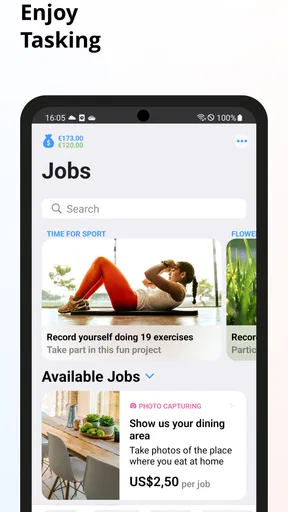
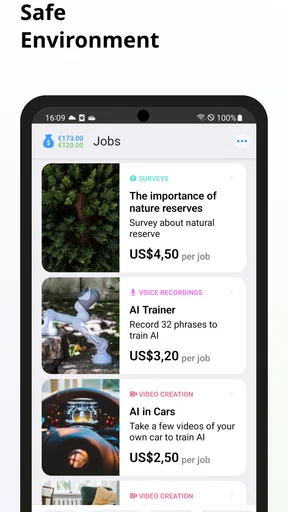
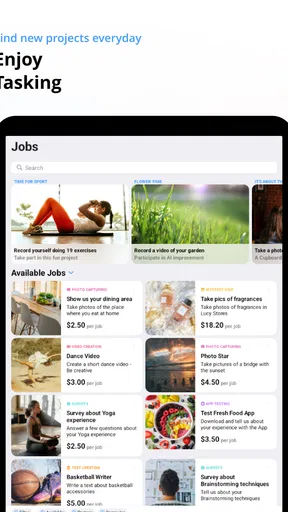
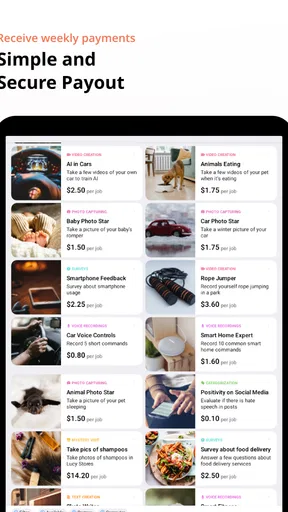
Once you're in, the app opens up a world of microtasks that you can complete for cash. These tasks range from data entry, surveys, web research, to even app testing. One thing that stood out to me was how diverse these tasks are. You're not just stuck doing the same thing over and over. There’s variety, which keeps things interesting.
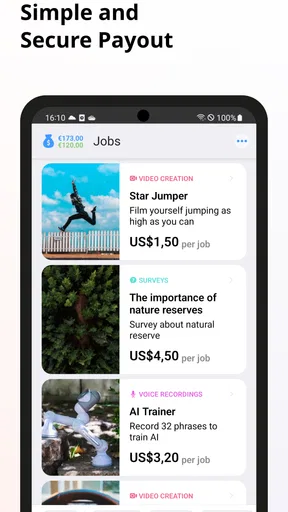
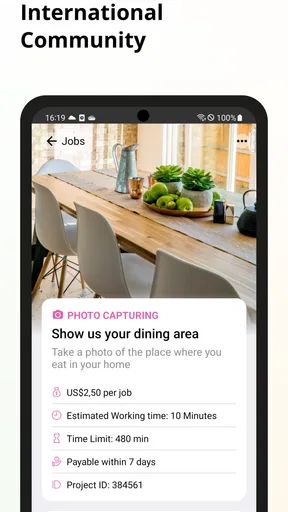
The task descriptions are clear, and they guide you through what needs to be done. Plus, they indicate how much you’ll earn for each task, so you know exactly what you're signing up for. I found this transparency to be a major plus. It’s not like you’re working in the dark, wondering if the payout is worth the effort.
How to judge a task before you commit
The listed reward is only one part of the decision. I also look at whether I have the right setting, enough uninterrupted time, and a clear understanding of what counts as a complete response. A modest reward can feel reasonable for a short, straightforward activity; the same amount may not be worthwhile if the job requires careful research or repeated steps. Treat the task description as a work brief, not a quick invitation to tap through.
One non-obvious habit that helps is to stop and reread the final instructions before submitting. In small online jobs, a response can be thoughtful yet still miss the requested format or scope. I’d also avoid relying on memory when a task asks for several details: keep the prompt visible and check each requirement as you go. This takes a little longer, but it is a better trade-off than rushing and having uncertainty about whether you followed the brief.
Another useful distinction is between tasks that suit a phone and tasks that merely happen to appear on one. Short surveys are naturally suited to brief mobile sessions. More involved research can be tiring on a small screen, especially if you need to compare information or keep multiple instructions in view. If the screen makes the work awkward, waiting until you can use a more comfortable setup—or skipping that task—is a sensible choice.
Payment and Earnings
Now, let’s talk money. How much can you actually make with Clickworker? Well, it depends on the tasks available and how much time you’re willing to invest. The earnings per task aren't going to make you rich overnight, but for a little extra pocket money, it’s not bad. Payments are made through PayPal, which is another win in my book—easy and secure.
One thing to note is that there’s a minimum payout threshold. It’s not too high, but it’s something to keep in mind. Once you hit that amount, you can cash out and treat yourself to a little something.
Keeping expectations realistic
I’d think of earnings as occasional extra money rather than a predictable monthly supplement. The number of suitable tasks can vary, and the time needed to complete one is not the same as the time spent earning from it. Checking what is available and deciding whether it fits your day is part of the effort, too. That distinction matters if you are comparing this with a job that pays for scheduled hours.
Before spending time on several tasks, consider how you will handle the payment side and the minimum needed to cash out. If your aim is a quick reward today, a threshold can make the timing feel slower than expected. If you are comfortable letting small amounts accumulate, it may be less of a concern. I would not count money as available for a particular bill until it has actually reached you.
Common points of confusion
A task appearing in the app does not mean it is automatically a good fit. Read the requirements and reward, then decide whether you can deliver the requested work in the time and setting available. If something is unclear, it is better to pause than to guess. The distinction between finishing quickly and meeting the brief is especially important for recording and research activities.
It is also easy to confuse an available task with a guaranteed stream of future work. I would check when it suits me rather than repeatedly refreshing or waiting around. This app is most comfortable as an opportunistic tool: use it when a suitable task lines up with your spare time, and move on when the options do not.
For anyone wondering whether it can replace a job, my answer is no—not in the way I would rely on a regular schedule or fixed wage. For someone asking whether a spare half-hour might be put to use, it can be worth exploring. The difference is not a flaw in the idea; it is simply the trade-off that comes with flexible, task-by-task work.
A realistic day with the app
Imagine you have a quiet half-hour before an appointment. I’d open the app, scan the available work, and pick a short survey or clearly scoped research task only if its instructions and reward seem fair for the time. If the only suitable option involves recording, I’d leave it for home rather than trying to capture audio in a noisy waiting room. That choice may mean earning nothing in that moment, but it avoids doing a task carelessly just to stay busy.
After finishing, I’d make a quick note of which kind of task felt comfortable and which was more demanding than expected. Over time, that personal comparison is more useful than assuming every task has the same effort-to-reward balance. It can help you use the app selectively instead of turning every spare minute into work.
The Community Vibe
One aspect I found interesting is the community feel that Clickworker fosters. There's a section in the app where you can connect with other users, share tips, and even get support. It’s like having a mini-forum right at your fingertips. If you ever get stuck or need advice, help is only a click away.
Who will get the most from it?
I think clickworker is best for people who are comfortable switching between small, self-contained jobs and can treat the money as a bonus. It may suit students between classes, people waiting for an appointment, or anyone who wants to try occasional online work without committing to a fixed schedule. The variety can also be appealing if you would rather alternate between a survey, research and a recording task than repeat one format every time.
I would skip it if you need reliable hours, immediate predictable income, or a task that is guaranteed to be available whenever you open the app. It is also a poor match for someone who dislikes reading instructions carefully or has no quiet place for work that involves speaking. In those cases, a conventional job or a focused survey service may be a better fit, depending on whether you value stable hours or a narrower, simpler task style.
My Overall Experience
Using Clickworker felt like a productive use of downtime. Whether you’re waiting for your coffee to brew or got a few minutes to spare during your commute, there’s always a quick task you can knock out. It’s not going to replace a full-time job, but it’s a handy tool for supplementing your income.
From my perspective, the app delivers on its promise. It's user-friendly, transparent, and offers a variety of tasks that keep things from getting monotonous. If you’re looking for a flexible and easy way to make some side cash, give Clickworker a whirl.
My recommendation for a first try
I’d install it with modest expectations, complete the setup carefully, and use the first session to learn how task instructions and rewards are presented. Choose one job that fits your surroundings, follow the brief closely, and assess the effort afterward. That gives you a fair test without assuming that a busy task list or a particular earning pace is guaranteed.
My final view is that clickworker is worth considering when flexibility matters more than consistency. The appeal is the chance to fit different small jobs into otherwise idle moments; the cost is uncertainty about what will suit you and when. If you can accept that balance and approach each task deliberately, it can be a useful phone-based side activity. If you need dependable income, I would look elsewhere.
So, what do you think? Ready to give it a shot and see how much you can earn in your spare time? Let me know how it goes!
Pros
- Flexible work schedule for users.
- Wide variety of tasks available.
- User-friendly interface design.
- Prompt payment for completed tasks.
- Supportive community and resources.
Cons
- Limited tasks in certain regions.
- Occasional technical glitches.
- Inconsistent task availability.
- Payment rates can be low.
- Complex tasks can be time-consuming.
FAQs for clickworker
What is Clickworker and how does it work?
Clickworker is a platform that connects businesses with a global crowd of freelancers for tasks like data entry, web research, and content creation. Users, known as 'clickworkers,' complete microtasks on their devices. After signing up and completing a profile, users can choose tasks based on their skills and interests. Payments are typically made upon task completion.
Is Clickworker free to use, and how do I get started?
Yes, Clickworker is free to use. To get started, download the app from the Google Play Store or Apple App Store, create an account, and fill out your profile. You may need to complete assessments to qualify for certain tasks. Once your profile is set up, you can start browsing and completing available tasks.
How do I get paid on Clickworker, and what are the payment options?
Clickworker pays users through PayPal or SEPA bank transfer. Payments are processed weekly, usually on Wednesdays, and you need to reach a minimum payout threshold to receive your earnings. Ensure your payment details are accurately provided in your profile to avoid any delays in receiving payments.
What types of tasks can I find on Clickworker?
Clickworker offers a variety of tasks, such as data categorization, text creation, surveys, and proofreading. Tasks vary in complexity and payment, allowing users to choose based on their skills and preferences. New tasks are constantly added, so regular checks are recommended to maximize opportunities.
Are there any specific system requirements to use Clickworker?
Clickworker can be accessed via the app on both Android and iOS devices or through a web browser on a desktop. Ensure your device has an updated operating system and a stable internet connection for optimal performance. Some tasks may require specific software or browser capabilities, which will be noted in the task description.


